
Why Your Scheduled Instagram Reel Did Not Publish
The failure nobody explains
You uploaded the video. You picked a time. The dashboard said Scheduled. The time came and went, and the reel is not on your profile. There is no error, or there is one that says An unknown error has occurred.
Almost every guide on Instagram scheduling is about when to post. Best times, engagement windows, day-of-week charts. Useful, but none of it explains the thing that actually broke. What broke is the mechanism underneath: Instagram does not have a "schedule this post" endpoint. Publishing is a two-step, asynchronous process with a state machine and a clock, and most schedulers are built in a way that quietly loses races against it.
We build Instagram scheduling at Socioverse, which means we have lost those races and fixed them. This is what the API actually does, where the failures come from, and the engineering that survives it. Every Meta-attributed claim below is quoted from Meta's own developer documentation, linked in Sources, accessed August 12, 2026.
First principle: publishing is two calls, not one
Meta's Content Publishing API splits a post into two separate requests.
Step one, create a container. You POST to the /<IG_ID>/media endpoint with your video URL. This does not publish anything. It hands Instagram the file and starts server-side processing, returning a container ID.
Step two, publish the container. You POST to /<IG_ID>/media_publish with that container ID.
Between those two calls, Instagram transcodes and validates your video, and that takes an unpredictable amount of time. Call step two too early and it fails, because the container is not ready. So you have to poll the container and wait for it to become ready.
That waiting period is the entire problem.
The container state machine
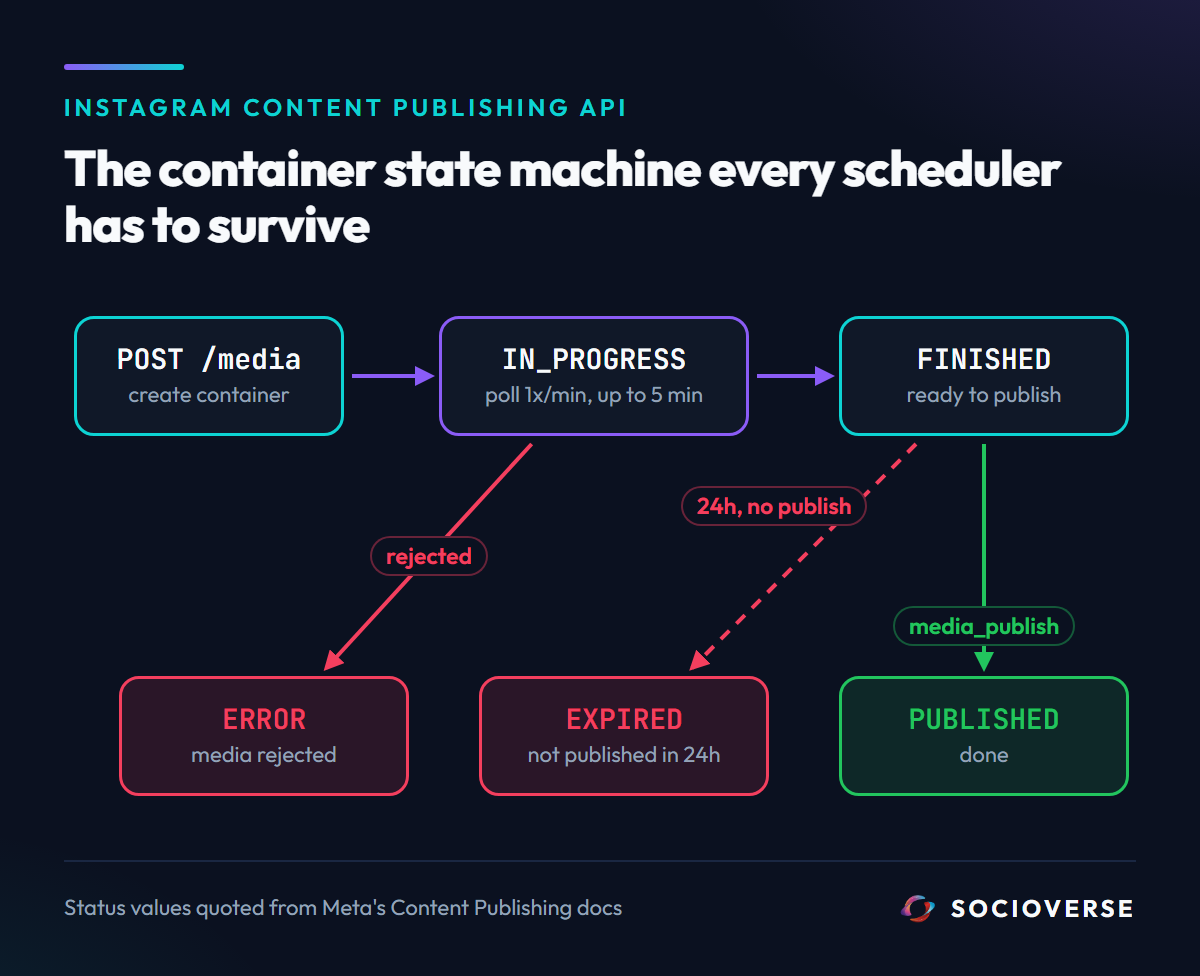
Polling a container returns a status_code. Meta documents exactly five values:
status_code |
Meta's definition | What it means for you |
|---|---|---|
IN_PROGRESS |
"The container is still in the publishing process." | Keep waiting. Not an error. |
FINISHED |
"The container and its media object are ready to be published." | Now call media_publish. |
PUBLISHED |
"The container's media object has been published." | Done. |
ERROR |
"The container failed to complete the publishing process." | Terminal. The media was rejected. |
EXPIRED |
"The container was not published within 24 hours and has expired." | Terminal. You ran out of clock. |
Two of those five are terminal failures, and they fail for completely different reasons. ERROR means Instagram rejected your file. EXPIRED means your scheduler never got around to publishing it. A tool that reports both as "failed to post" is hiding the only piece of information that would tell you whether to re-encode your video or blame your scheduler.
Where schedulers actually break
Here is the sentence in Meta's documentation that decides your architecture:
"We recommend querying a container's status once per minute, for no more than 5 minutes."
Read that again with an engineer's eyes. Meta is telling you a container can legitimately take five minutes to become ready.
Now consider how most modern schedulers are built: a serverless function fires at the scheduled time, creates the container, and polls until it is ready. Serverless functions have a wall-clock limit, and it is typically well under five minutes. So the function does one of two things when the video is still processing:
- It blocks and gets killed. The platform terminates the invocation mid-poll. The container was fine and would have finished 40 seconds later, but nothing ever calls
media_publish. The container sits atFINISHEDuntil, 24 hours later, it flips toEXPIRED. - It gives up and marks the post failed. Same outcome, more honest logging.
Either way, your reel does not publish, and the video was never the problem. This is why the failure feels random: it depends on how busy Instagram's transcoding queue was that minute. A 20-second clip that published fine on Tuesday fails on Friday.
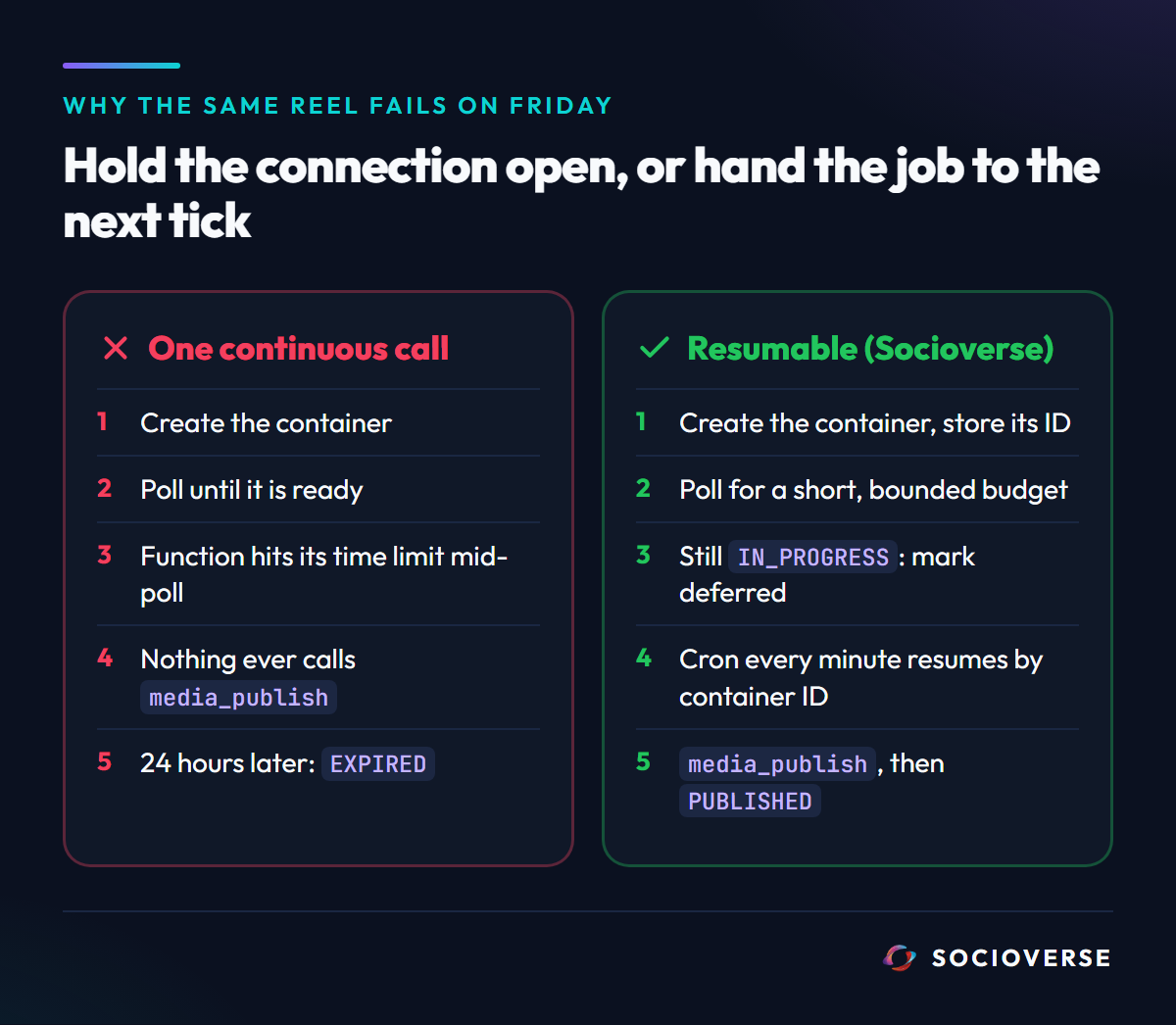
The fix is to stop treating publishing as one continuous operation. The container ID is durable. Once you have it, any later process can resume the job. So the correct design is to persist the container ID immediately, poll for a short bounded budget, and if it is still not ready, hand the work to the next scheduled tick instead of holding the connection open.
That is what Socioverse does. Our publisher polls for a deliberately short window per invocation, and if the container is still IN_PROGRESS when that budget runs out, it does not fail the post and it does not block. It marks the post as deferred and returns. A cron worker runs every minute, picks up any deferred post by its stored container ID, and resumes polling exactly where it left off. A slow transcode costs you a minute of latency instead of the entire post.
The failure modes, and what each one actually means
1. Silent expiry (the one that looks like a ghost)
What Meta documents: a container expires if not published "within 24 hours."
What it looks like: the post sits in your dashboard forever, or flips to failed a day later with no explanation.
The cause: nothing ever called media_publish on a container that was ready. Almost always a killed or abandoned publishing process.
How we prevent it: every deferred post is retried by container ID on the next cron tick, and stuck posts are swept separately. A post cannot fall out of the system just because one invocation died, because the invocation is not where the state lives.
2. The unknown error
What it looks like: status_code: ERROR, and a status message that literally reads An unknown error has occurred.
The cause: Instagram rejected the media, and the API is genuinely unhelpful about why. In practice it is a spec violation. Meta's documented Reels requirements:
| Property | Meta's specification |
|---|---|
| Video codec | "HEVC or H264, progressive scan, closed GOP, 4:2:0 chroma subsampling" |
| Audio codec | "AAC, 48khz sample rate maximum, 1 or 2 channels (mono or stereo)" |
| Container | "MOV or MP4 (MPEG-4 Part 14), no edit lists, moov atom at the front of the file" |
| Frame rate | "23-60 FPS" |
| Aspect ratio | "between 0.01:1 and 10:1 but we recommend 9:16 to avoid cropping or blank space" |
| Duration | 3 seconds minimum, "15 mins maximum" |
| Video bitrate | "VBR, 25Mbps maximum" |
| File size | "300MB maximum" |
The two that catch people most often are the audio codec and the moov atom. A video exported with a 44.1kHz-only pipeline, or an MP4 written with the moov atom at the end of the file (the default in some encoders), will be rejected with no useful message.
How we handle it: when Instagram returns ERROR with an empty or useless status message, we replace it with the actual likely causes rather than passing An unknown error has occurred. through to you. An error message you can act on is worth more than a faithful reproduction of an unhelpful one.
3. The 24-hour publishing ceiling
What Meta documents: "Instagram accounts are limited to 100 API-published posts within a 24-hour moving period. Carousels count as a single post."
This is a moving window, not a daily reset at midnight. If you burn your quota at 3pm, you do not get it back at midnight, you get it back at 3pm the next day. Bulk schedulers that queue a large backlog and fire it in one burst can wedge an account against this ceiling and then fail every remaining post in the queue.
How we handle it: publishing is drained by a paced worker rather than fired in bursts, and carousels are correctly counted as a single post rather than one per image.
4. Asking for a field that does not exist
This one is ours, and it is the most useful thing in this article for anyone building against this API.
When you poll a container, you request fields. We requested copyright_check_status alongside status_code, because knowing about a copyright flag before publishing is obviously valuable. On our API version and token type, that field did not return a value. It returned a Graph API error for the whole request.
The consequence was subtle and expensive. Our poller saw an error payload rather than a status_code, could not determine the container state, and concluded it should keep waiting. It deferred. The next tick did the same thing. Posts sat in a permanent deferred loop, never failing loudly enough to page anyone, never publishing.
The fix was to request the minimal supported field set and to treat a structured Graph API error as a terminal state rather than an unknown one. The general lesson: in a state machine driven by a remote API, "I could not read the state" must never be silently equivalent to "the state has not changed yet." One of those is a wait, the other is a bug, and conflating them produces exactly this class of infinite quiet failure.
What to check when your reel does not publish
- Is there a container ID stored against the post? If not, step one failed and the problem is your video URL or your token. If yes, step one worked and the problem is downstream.
- Did the post fail instantly or silently linger? Instant failure points at media specs. Lingering points at an abandoned publishing process.
- Re-encode before you re-upload. H.264 video, AAC audio at 48kHz, MP4 with the moov atom at the front, 9:16. This resolves the majority of
ERRORcases. - Check your 24-hour count across every tool touching the account, not just this one. The limit is per Instagram account, not per app.
- Check your token. An expired or de-scoped token surfaces as a Graph API error mid-poll, which weak pollers misread as "still processing."
Frequently asked questions
Why did my scheduled Instagram reel not post?
Most often because the publishing process was abandoned between container creation and media_publish. Instagram publishing is asynchronous, containers can take minutes to become ready, and a scheduler that cannot survive that wait leaves a ready container unpublished until it expires 24 hours later.
Does Instagram have a real scheduling API?
No. There is no "publish at 6pm" parameter. Every scheduling tool stores your post and calls the Content Publishing API at the chosen moment. The quality of a scheduler is entirely in how it handles that moment failing.
What does status_code IN_PROGRESS mean?
The container is still being processed by Instagram and is not yet publishable. It is not an error. Meta recommends polling once per minute for up to five minutes.
How many posts can I publish through the API per day?
100 within a rolling 24-hour period per Instagram account, with carousels counting as one post.
Why does Instagram say "An unknown error has occurred"?
It is the generic rejection message when media fails validation. It nearly always means a specification violation, most commonly the audio codec, the moov atom position, or the frame rate.
Can I just re-upload the same video?
If the container reported ERROR, re-uploading the identical file will fail identically. Re-encode it first. If the container EXPIRED, the file is probably fine and the scheduler is the problem.
Sources and references
All Meta-attributed quotes were taken from the following pages, accessed August 12, 2026.
- Two-step container and publish flow,
status_codevalues (IN_PROGRESS,FINISHED,PUBLISHED,ERROR,EXPIRED), the 24-hour container expiry, the "once per minute, for no more than 5 minutes" polling guidance, and the 100-post rolling 24-hour limit: developers.facebook.com - Instagram Content Publishing - Reels media specifications (codecs, container format, frame rate, aspect ratio, duration, bitrate, file size): developers.facebook.com - IG User Media reference
- Socioverse: socioverse.io
Related reading: how we engineer DM automation against Meta's rate limits, AI content generation for Instagram, and analytics reporting.