
Can You Schedule an Instagram Story With a Link Sticker? What the API Actually Publishes
The failure nobody explains
You planned a week of stories. The one that matters has a link sticker to your offer. You open your scheduler, add the image, go looking for the sticker option, and either it is not there, or the moment you add it the tool quietly changes the post from publishing automatically to sending you a reminder on your phone.
It looks like a missing feature. It is the same in every tool, which should be the first clue that it is not a feature at all.
The reason is a single sentence in Meta's API reference. Every scheduler that publishes through the official Instagram API is bound by it, and the way each one handles it tells you how honest that tool is being about what "scheduled" means.
We build Instagram scheduling at Socioverse, including stories. This is what the API actually lets a third-party tool publish in a story, what it rules out, and the two workarounds that genuinely work. Every Meta-attributed claim below is quoted from Meta's developer documentation, and every competitor claim from that competitor's own help centre, linked in Sources, accessed September 13, 2026.
First principle: "scheduled" means two different things
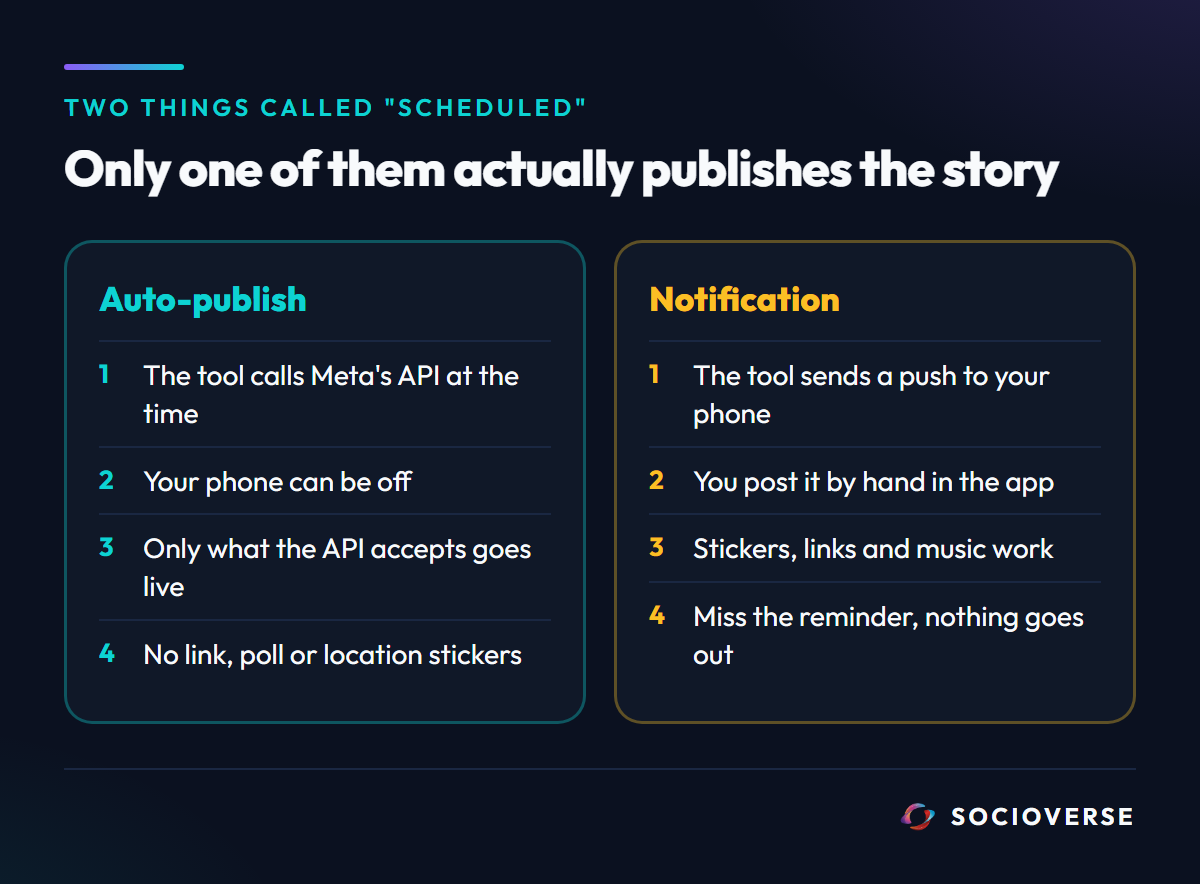
There are two ways a tool can get a story onto your profile at a chosen time, and they are not variations of one feature.
Auto-publishing. The tool calls Meta's Content Publishing API at the scheduled time. For stories that means creating a media container with media_type set to STORIES and publishing it. Your phone can be off. What goes live is exactly and only what the API accepts.
Notification publishing. The tool does not publish anything. At the scheduled time it sends a push notification to your phone, and you open Instagram and post the story yourself, by hand, in the app. Later's help centre describes the two methods side by side: with Auto Publish the story goes out automatically at its scheduled time, while with notification publishing Later sends a notification to your mobile device at that time and you finish publishing in Instagram.
Everything the Instagram app can do is available in the second method, because a person is doing it in the app. Only what the API allows is available in the first. The sticker question lives entirely in that gap.
The sentence that decides it
From Meta's IG User Media reference, in the section on publishing stories:
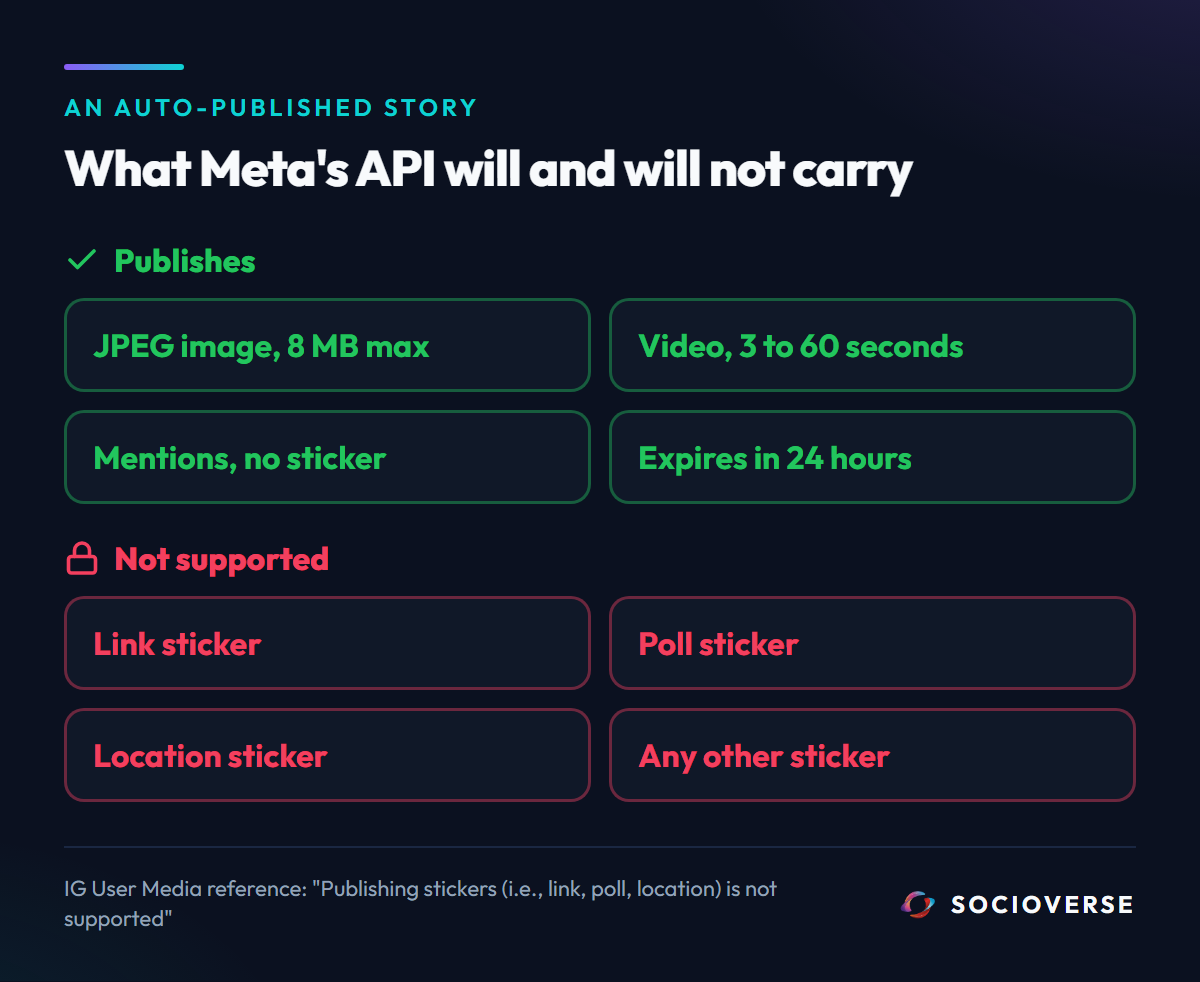
"Publishing stickers (i.e., link, poll, location) is not supported; however mentioning users without a sticker is supported."
There is no permission scope that unlocks stickers, no app review that adds them and no higher-tier API. The link sticker is the only way to put a tappable link inside a story, and it is exactly the element the publishing API excludes.
The competitors say the same thing in their own help centres, framed around their own switch. Later states that Instagram Story link stickers are not available when scheduling stories directly and points you to notification publishing, then adding the sticker in Instagram. Buffer's help centre says Instagram does not allow third-party tools to publish automatically when a post includes features such as music, Story links, Story text or stickers, and that choosing one switches the post to its Notify Me reminder flow.
That switch is the part worth noticing. A sticker story in any scheduler is a reminder, not a scheduled post. If you are not holding your phone at the scheduled time, it does not go out.
What the API will publish in a story
Here is the full picture of what an auto-published story can and cannot carry, from the same reference:
| Element | Through the API | Meta's wording |
|---|---|---|
| Link sticker | No | "Publishing stickers (i.e., link, poll, location) is not supported" |
| Poll sticker | No | Same sentence |
| Location sticker | No | Same sentence |
| Mentioning users | Yes, without a sticker | "however mentioning users without a sticker is supported" |
| Lifespan | 24 hours | "Stories expire after 24 hours." |
| Image format | JPEG | "Format: JPEG" |
| Image size | Up to 8 MB | "File size: 8 MB maximum." |
| Image aspect ratio | 9:16 recommended | "We recommended 9:16 to avoid cropping or blank space" |
| Video length | 3 to 60 seconds | "Duration: 60 seconds maximum, 3 seconds minimum" |
| Video size | Up to 100 MB | "File size: 100MB maximum" |
Music is the other element people expect and do not get. Both Later and Buffer list music among the things that force their reminder flow for stories.
So an auto-published story is, in practice, a finished visual: an image or a short video, correctly sized, that expires in a day. Anything interactive that you would add by tapping inside the Instagram story editor is outside the contract.
Three ways this goes wrong
1. Designing the sticker into the image
The instinct is to fake it: draw a button that says "tap here" onto the image. It publishes fine, and nothing is tappable. A viewer taps a picture of a link and gets the next story. It is the worst of both options, because it teaches your audience that your story links do not work.
2. Trusting a reminder you will not be awake for
Notification publishing is honest about what it is, and it is still a person-dependent step. A reminder at 7:00 in the morning, when you planned the story to catch a launch, only works if you are holding your phone at 7:00. The value of scheduling, not being there, is exactly what the sticker story gives up.
3. Assuming a story can carry a link at all without the sticker
Stories do not have clickable captions. Outside the link sticker there is no in-story field that turns into a tappable link, so there is nothing to fall back on inside the story itself. The link has to live somewhere else.
The two workarounds that actually work
Workaround 1: publish the sticker story by hand, schedule everything else
Keep auto-publishing for stories that are complete as images or video, and post the one sticker story yourself. That is what notification publishing is, with the reminder made explicit. It is the right call when the link sticker itself is the point and you can commit to being there.
Workaround 2: move the link out of the story and into a DM
This is the one that survives you not being there, and it is the mechanism we actually use.
A story can say "reply LINK and I will send it to you". Replying to a story is a message, and a message is something the Instagram Messaging API lets your app answer. A story reply automation catches the reply, matches the keyword, and sends the link in a direct message within seconds, while the story itself goes out on schedule through the API with no sticker at all.
That route has advantages the sticker does not. The person who replied is now in your inbox and in your lead list, not just a tap in a view count. And the link lands somewhere they can find again after the story has expired.
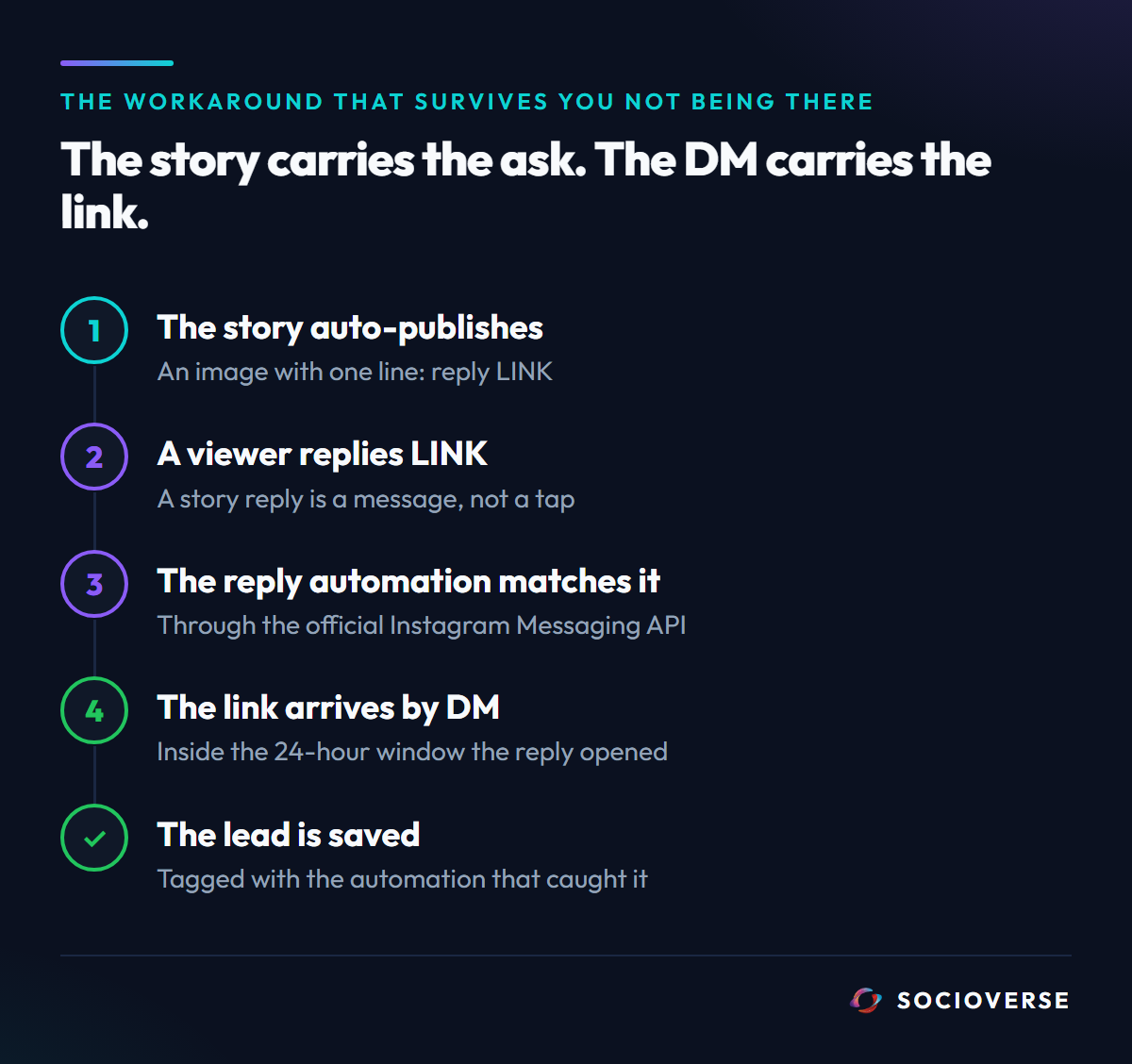
It has its own rules, which we wrote up in detail in why story reply automation loses the story: the story's media URL stops working when the story expires, some reply types never reach the webhook, and the reply opens a 24-hour messaging window you have to answer inside. Build for those and the DM is a more durable link than the sticker ever was.
How Socioverse handles stories
We made a deliberate choice: Socioverse Calendar only auto-publishes. There is no reminder mode. A post you schedule is published through the official Meta API at its time, whether your phone is on or off, or it fails with a reason.
Story publishing is image-only today. A story is published through its own path: the image URL is preflighted to confirm it is reachable, non-empty and actually an image, then sent to Meta as a container with media_type set to STORIES. It rides the same defer-and-resume publisher as reels and carousels, so a slow container is retried on the next tick rather than dropped. Video stories are not part of this path yet, and we would rather state that than let a video story fail at publish time.
No fake stickers. Because the API cannot carry them, the story composer does not offer them, and nothing silently converts your post into a reminder.
The link goes through a story reply automation instead. Pair a scheduled story with a keyword reply automation, and the link is delivered by DM to everyone who asks for it, through the official Instagram Messaging API, with each person saved to the Lead Bank.
What to check before you schedule a story
| If your story needs | Do this |
|---|---|
| Only an image or short video | Auto-publish it: JPEG under 8 MB at 9:16, or video between 3 and 60 seconds |
| A link sticker, and you will be holding your phone | Post that one by hand, or use a reminder |
| A link, and you will not be there | Auto-publish the story with a "reply for the link" line, and let a reply automation send it |
| A poll or location sticker | Post it by hand. The API cannot publish either |
| To mention another account | Auto-publishing can mention users, just not with a sticker |
| Music | Post it by hand |
Frequently asked questions
Can you schedule an Instagram story with a link sticker?
Not as an automatic publish. Meta's API reference states that publishing stickers, including link, poll and location stickers, is not supported. Tools that offer it switch the story to a reminder, and you add the sticker yourself in the Instagram app.
Why does my scheduler change my story to a notification?
Because the story includes something the API cannot publish, such as a sticker, a link or music. Notification publishing sends you a reminder to post it by hand, which is the only way those elements can be added.
Can a scheduled Instagram story include a link at all?
Not a tappable one inside the story. The practical alternative is to ask viewers to reply with a keyword and deliver the link by direct message with a story reply automation.
Can an API-published story mention other accounts?
Yes. Meta's reference says mentioning users without a sticker is supported. The mention sticker itself is not.
What size should a scheduled Instagram story be?
For images, JPEG up to 8 MB, with 9:16 recommended to avoid cropping. For video, MP4 or MOV between 3 and 60 seconds and up to 100 MB.
Does Socioverse support video stories?
Not yet. Story publishing in Socioverse is image-only today, auto-published through the official Meta API.
Sources and references
Meta quotes are verbatim; Later and Buffer are paraphrased from their help centres. All pages accessed September 13, 2026.
- Story publishing rules (stickers not supported, mentions without a sticker supported, stories expire after 24 hours) and story image and video specifications: developers.facebook.com - IG User Media reference
- The container flow and
media_typeset toSTORIES: developers.facebook.com - Instagram Content Publishing - Later's Auto Publish and notification publishing for stories, and link stickers: help.later.com - Schedule & Publish Instagram Stories
- Buffer's Notify Me flow for music, Story links, text and stickers: support.buffer.com - Adding music, stickers, and other effects to Instagram and TikTok posts
- Socioverse: socioverse.io
Related reading: why Instagram story reply automation loses the story, why your Instagram carousel failed to publish, and Instagram scheduling.