
Why Instagram Automations Stop Working After 60 Days
The failure that never shows an error
The automation worked for two months. You set up the comment trigger, watched the DMs go out, checked the lead list, and stopped thinking about it. That is the point of automation.
Then someone tells you they commented and got nothing. You open the dashboard. It says Connected. The automation is switched on. The template is intact. Nothing says a word about a failure, because from the software's point of view there was no failure. There was a credential that quietly reached the end of its life, and a system that never checked.
Most writing about automation reliability covers the visible failures: a post that would not publish, a DM that bounced, a rate limit. Those are loud and they get fixed. The expensive one is silent. An Instagram connection is not a setting you toggle once. It is a 60-day credential, it expires on a schedule Meta publishes openly, and every possible way it can die comes back as the same error code. Whether you find out an hour later or three months later is not a property of Instagram. It is an engineering decision the tool made on your behalf and probably never mentioned.
We build Instagram DM automation and scheduled publishing at Socioverse, which means we have had to hold every one of those decisions, and we got one of them wrong for months. This is the actual lifecycle, the actual error surface, and what a tool has to do about it.
First principle: connecting Instagram issues a pass, not a key
A key opens the door forever. A pass expires. Meta issues passes.
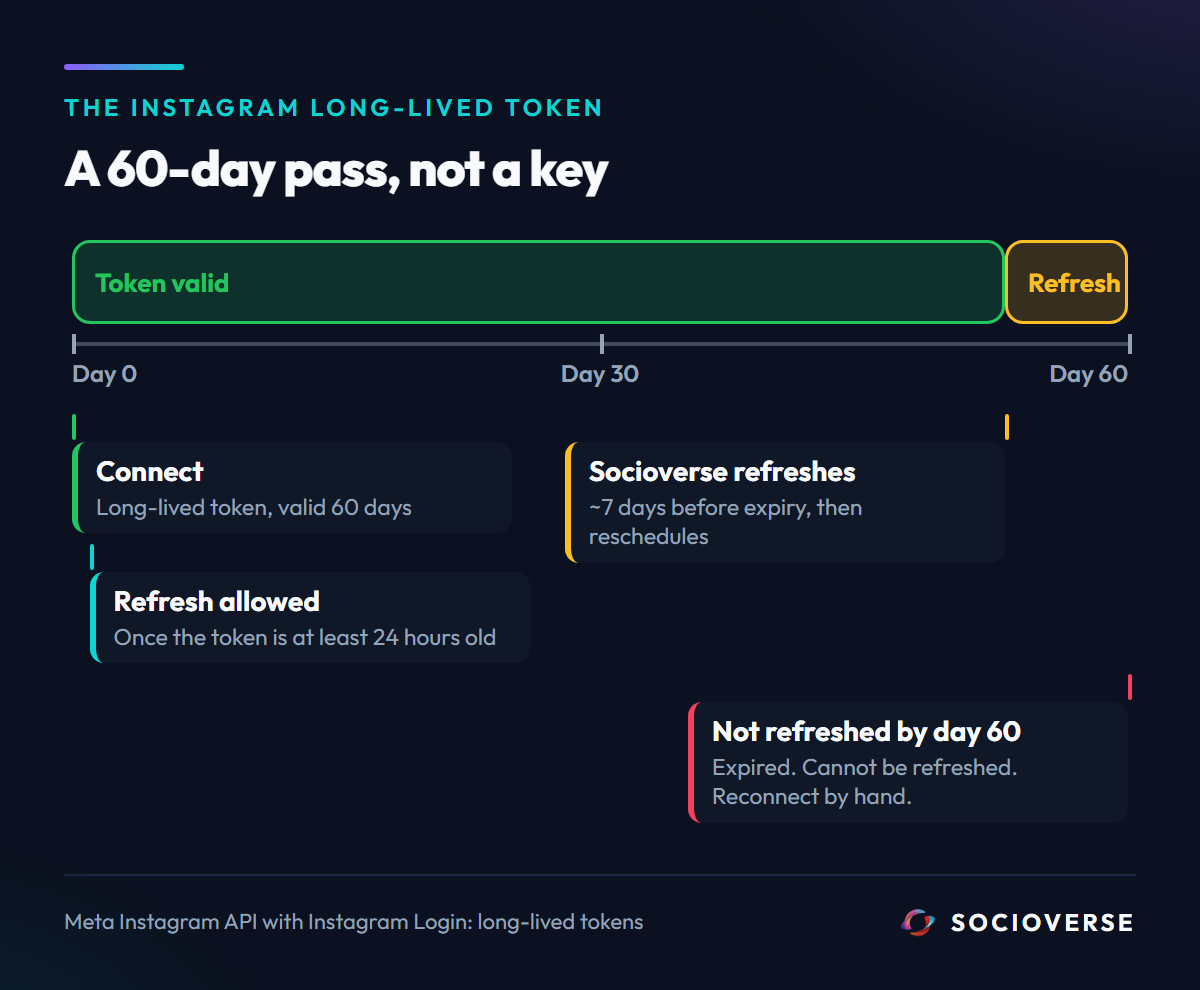
When you connect an Instagram account to any third-party tool through the official API, an OAuth exchange produces a short-lived token, which is immediately traded for a long-lived one. Meta's documentation for the Instagram API with Instagram Login is unambiguous about what you get: you can exchange the short-lived token "for a long-lived access token that is valid for 60 days."
Sixty days is not a deprecation warning or a worst case. It is the design. Every connected Instagram account in every tool you have used is on a rolling 60-day clock, and the only thing between you and a dead integration is whether that tool refreshes the pass before the clock runs out.
Meta provides the refresh mechanism, with two conditions that matter more than they look:
| Fact | Meta's wording | What it means for a tool |
|---|---|---|
| Lifetime | "valid for 60 days" | The connection has a hard expiry from the moment it is made |
| Refresh call | GET /refresh_access_token with grant_type set to ig_refresh_token |
Refreshing is a deliberate API call, never automatic |
| Minimum age | "The existing long-lived access token is at least 24 hours old" | You cannot refresh immediately after connecting. A naive "refresh on every request" design fails on day one |
| The hard deadline | "Tokens that have not been refreshed in 60 days will expire and can no longer be refreshed." | Miss the window and there is no recovery path. No retry, no support ticket, no grace period. The user must reconnect by hand |
That last row is the whole problem. An expired Instagram token is not a degraded state you can back off from and repair later. It is terminal. A tool that discovers the expiry after the fact has already lost, and every hour between the expiry and the user finding out is downtime nobody is measuring.
1. Every death looks identical
If tokens simply aged out, this would be a calendar problem. They do not. A connection also dies when the user changes their Instagram password, when Instagram invalidates the session, when the app grant is revoked, or when the account is flagged and needs a login at instagram.com to clear a notice.
Meta reports all of it as error code 190. The docs define it as "Access token has expired" with the instruction "Get a new access token." The distinguishing detail lives in subcodes and, more often in practice, in the human-readable message string:
| Subcode | Meta's definition | What actually happened |
|---|---|---|
| 458 App Not Installed | "The User has not logged into your app. Reauthenticate the User." | The app grant was removed |
| 460 Password Changed | "they must log in to the app again" | Password change revoked every connected app |
| 463 Expired | "Login status or access token has expired, been revoked, or is otherwise invalid." | The 60-day window closed |
| 467 Invalid Access Token | "Access token has expired, been revoked, or is otherwise invalid." | Catch-all invalidation |
| 492 Invalid Session | "User associated with the Page access token does not have an appropriate role on the Page." | A permissions change on the linked asset |
Two consequences follow, and most tools only handle the first.
One: the code alone does not tell you what to say to the user. "Your Instagram pass expired, reconnect in thirty seconds" and "you changed your password, which cancelled every connected app" are the same 190. So is "a key rotated on our side and we can no longer read your stored credential", which is not the user's fault at all. Socioverse classifies the failure by parsing the message string, because it is the only signal Meta offers, and the notice the owner receives names the actual cause. A generic "something went wrong" trains people to ignore the email.
Two: none of these are retryable, and treating them as retryable is actively harmful.
2. The retry instinct is wrong here, and it is expensive
Every well-built system retries transient failures. That instinct is correct almost everywhere and wrong for a 190.
A password change is not going to un-happen on the next attempt. A revoked grant is not going to come back. A credential we cannot decrypt will not decrypt in six hours. Every one of those retries is a Graph API call spent on a guaranteed rejection, and a queue row that circles forever without a human ever being told the connection is dead. The retry loop does not just waste calls. It hides the failure, because a job that is still "pending" looks like a job that is still working.
So the refresh path splits failures in two before it decides anything:
- Permanent. Error code 190 in any form, or our own decrypt failure, or a message containing changed their password, session has expired, session has been invalidated, or till you log in. These consume no retries. The queue row is closed as failed, the account is flipped to disconnected, and the owner is told, with the specific cause in hand.
- Transient. Anything else. A network blip, a 500, a timeout. These get the retry budget, because these are the failures a retry can actually fix.
The rule is simple to state and easy to get wrong: a retry budget is for failures that a retry can fix. Spending it on a dead credential converts a fixable thirty-second reconnect into weeks of silence.
3. The status lies before the sending stops
Here is the part we got wrong, and it is the failure mode most likely to be sitting in whatever tool you use right now.
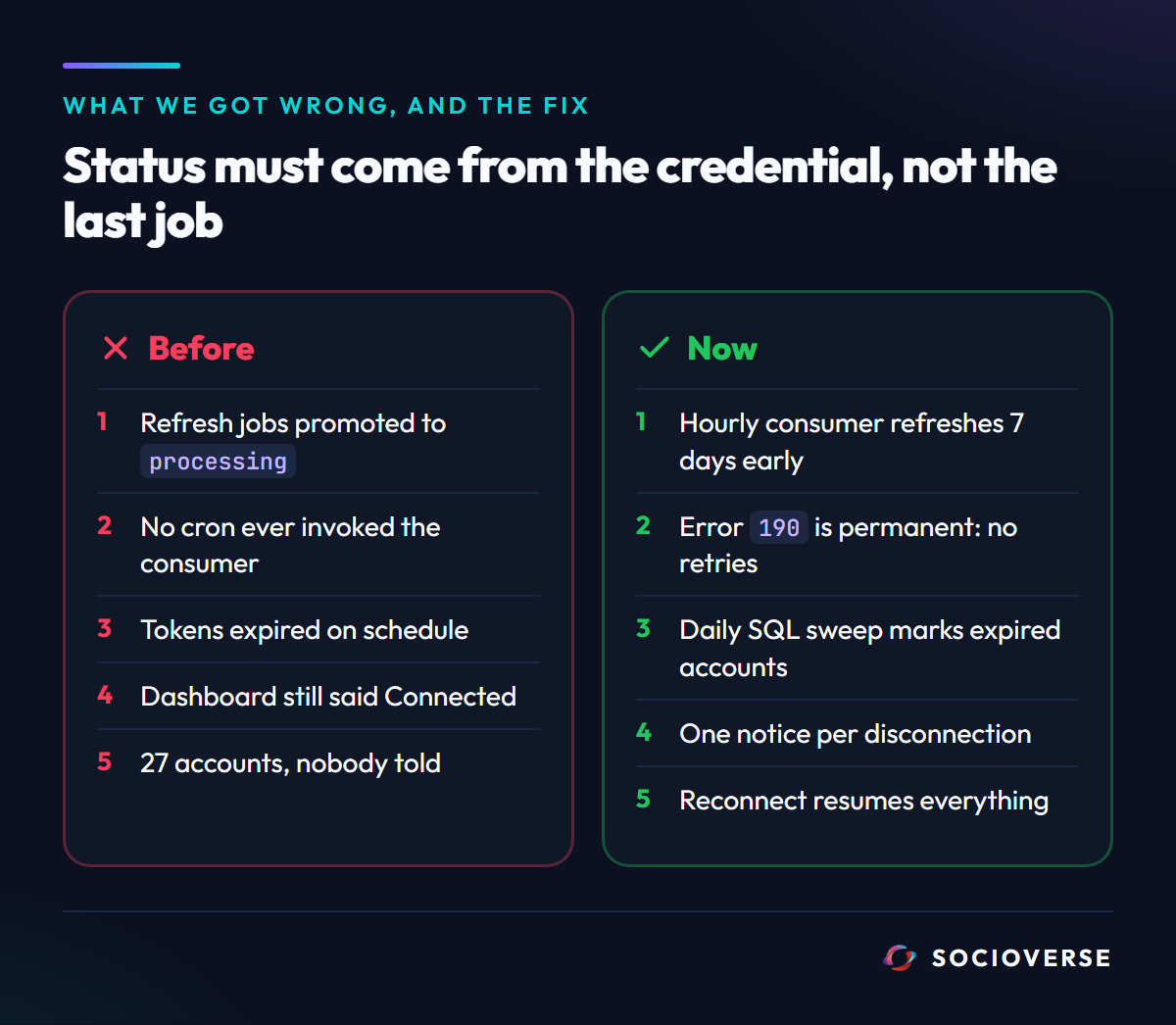
Our refresh design was a two-stage queue. On connect, a refresh job is scheduled for seven days before expiry. A cron promotes due jobs to processing. An edge function consumes processing jobs, calls Meta's refresh endpoint, stores the new token, and schedules the next refresh.
Every piece of that existed. Except no cron ever invoked the consumer.
Jobs were promoted to processing and sat there. Tokens expired on schedule with nothing calling the refresh endpoint. And because the account status only ever changed to disconnected inside that function, accounts with dead tokens stayed marked active in the database. The dashboard said Connected. The status column agreed. The only visible symptom was a confusing "Failed to sync media" error in the automations screen, which reads like a sync bug and not like a dead credential.
That is the shape of the whole problem in one paragraph: the status field is derived from the last thing that ran, not from whether the credential is alive. When the thing that runs never runs, the status stops meaning anything and starts actively lying.
The fix was two crons, and the second one matters more than the first:
- The missing consumer. An hourly job that actually invokes the refresh function, draining
processingjobs so tokens are refreshed roughly seven days before expiry. - A reconciliation sweep. A daily job that marks any account with a past expiry as disconnected, in plain SQL, without depending on the refresh path at all.
The second cron is a safety net whose entire purpose is to work when the first one is broken. It touches no queue and calls no API, so there is nothing in it to break. If a token is past its expiry, the account is disconnected, full stop. Any pipeline that determines user-visible state needs a check that does not run inside the pipeline it is checking.
4. What we found when we finally looked
When the notification path was built, the first thing it did was count the accounts already sitting in a disconnected state with nobody having been told.
Twenty-seven. The oldest since February.
Those are connected Instagram accounts in our own database, not customers, and every one of those owners believed their automations were running. They were not. Auto-replies were not sending, scheduled posts were not publishing, analytics had stopped updating, and the product had said nothing for months.
We publish this because it is the most useful thing in the post. The bug was not exotic. It was a missing line in a cron schedule, in a pipeline where every other component was correct, and it was invisible precisely because the failure mode was silence. If it happened here it is happening elsewhere, and the way you find out is to look, not to assume.
5. What the system does now
The full path, end to end:
- On connect, the token is encrypted per workspace before storage and a refresh job is scheduled for seven days before expiry. Nothing is stored in plaintext, and the encryption is scoped so one workspace's credential cannot be read with another's context. More on how credentials are handled is on our security page.
- Hourly, the consumer drains due jobs and calls Meta's
refresh_access_tokenendpoint. A success stores a fresh 60-day token, re-fetches the profile in the same pass (Instagram's profile picture URLs expire too, so a stale one is a broken avatar in your dashboard), records an audit entry, and schedules the next refresh seven days before the new expiry. The cycle is self-perpetuating: as long as the account is alive and the consumer runs, the connection never expires. - On failure, the classifier decides permanent or transient. Transient gets the retry budget. Permanent closes the job, marks the account disconnected, and hands the specific cause to the notifier.
- Daily, the reconciliation sweep catches anything the refresh path missed, in SQL, independently.
- On disconnect, the owner gets exactly one notice naming what happened, what stopped, and what to click. Delivery is deduped on a single marker column, stamped on send and cleared on reconnect, so one disconnection produces one email and a later one can notify again. The notice states plainly that nothing was deleted, because the first fear on reading "disconnected" is that the work is gone.
- On reconnect, the status returns to active, the marker clears, and a fresh refresh job is scheduled. Automations, templates and scheduled posts were never touched, so they resume.
One deliberate design note: the notifier ships disarmed, behind an explicit environment flag. Deploying an hourly cron that emails real people should be a decision somebody makes on purpose, not a side effect of a deploy.
What to check in your own stack
None of this is specific to us. Any tool holding an Instagram connection faces the same lifecycle, so these are answerable questions to put to whatever you use:
- Does it refresh proactively, or react to a failure? Reacting is already too late. Once a token passes 60 days unrefreshed, Meta's own documentation says it "can no longer be refreshed", and reconnecting by hand is the only path left.
- Does anything verify the connection independently of the sending path? If the only thing that would notice a dead token is the code that uses it, a broken pipeline means an indefinitely wrong status.
- Does it tell you, unprompted, when a connection dies? A red dot on a dashboard you open twice a month is not a notification.
- Does the notice say why? "Reconnect your account" and "your password change cancelled every connected app" cost the same to send and differ enormously in whether the fix sticks.
- Does it retry a dead credential? If your logs show repeated attempts on the same account, the tool is treating a permanent failure as a transient one, and nobody is being told.
And one thing to do yourself, which takes ten seconds and catches most of it: after any Instagram password change, open your automation tool and check the connection. A password change revokes every connected app. That is Meta working as designed, and it is the single most common cause of an automation that stopped for no apparent reason.
Frequently asked questions
Why did my Instagram automation stop working on its own?
The most likely cause is an expired access token. Instagram issues connected apps a credential valid for 60 days. If the tool did not refresh it in time, or if you changed your Instagram password, the connection is dead and needs to be re-established by hand. The automation itself is usually fine.
Does Instagram notify me when a connected app is disconnected?
No. Instagram invalidates the credential and returns an error to the app. Whether you hear about it is entirely up to the tool. This is why an app can keep showing "Connected" long after it has stopped working.
Does changing my Instagram password break my automations?
Yes. A password change cancels every connected app's access, which Meta reports as error 190 with the password-changed subcode. Reconnect the account after any password change.
How often does Socioverse refresh the connection?
A refresh is scheduled for seven days before expiry, and an hourly job drains the queue, so a live account is refreshed well inside Meta's 60-day window. A daily reconciliation sweep independently marks any account with a past expiry as disconnected, so the status is never derived only from the refresh path.
If my account disconnects, do I lose my automations?
No. Automations, templates, scheduled posts and captured leads are stored independently of the connection. A disconnection stops sending and publishing. It deletes nothing. Reconnecting resumes everything.
Can an expired token be recovered without reconnecting?
No. Meta's documentation states that a token unrefreshed for 60 days expires and can no longer be refreshed. Reconnecting through the Instagram permission screen is the only path, and it takes about thirty seconds.
Sources and references
All Meta-attributed quotes were taken from the following pages, accessed September 2, 2026.
- Long-lived token validity of 60 days, the
/refresh_access_tokenendpoint, theig_refresh_tokengrant type, the 24-hour minimum age, and the statement that tokens unrefreshed for 60 days "will expire and can no longer be refreshed": developers.facebook.com - Instagram API with Instagram Login, Business Login - Error code 190 ("Access token has expired") and authentication subcodes 458, 460, 463, 467 and 492: developers.facebook.com - Graph API Error Handling
- Socioverse: socioverse.io