
Instagram Carousel Failed to Publish? Which Slide Broke It
The failure nobody explains
You built a ten-slide carousel. Every slide looks right in the preview. The scheduled time comes, and instead of a post you get something like this:
Only photo or video can be accepted as media type.
You check. Every slide is a photo. Nothing about the error matches what is in front of you, and the tool offers no hint about which of the ten files it is talking about.
That exact message is from our own logs, on a carousel that failed at slide seven. It is error code 9004 with subcode 2207052, and the message is misleading in a very specific way that we will come back to.
Almost everything written about Instagram carousels is about what goes inside them: slide counts, hooks on slide one, swipe-through rates. Useful, and none of it explains the failure above. What broke is the publishing mechanism. A carousel is not one upload. It is up to eleven separate objects on Meta's side, created independently and bound together at the end, and any one of them can sink the rest.
We build Instagram scheduling at Socioverse, including carousels. This is how Meta's carousel publishing actually works, the limits that decide whether your post goes out, and the engineering that tells you which slide broke. Every Meta-attributed claim below is quoted from Meta's developer documentation, linked in Sources, accessed September 13, 2026.
First principle: a carousel is eleven containers, not one post
For a single image or reel, Meta's Content Publishing API is a two-step flow: create a media container, then publish it. We covered that flow and its failure modes in why scheduled reels fail to publish.
A carousel adds a layer. Every slide gets its own container first:
- One child container per slide. Each is created against
/<IG_ID>/mediawithis_carousel_itemset, which Meta defines as: "If the media will be part of a carousel, set totrue". - One parent container for the carousel. Created with
media_typeset toCAROUSELand achildrenparameter, which Meta describes as "A comma separated list of up to 10 container IDs of each image and video that should appear in the published carousel." - One publish call on the parent.
So a ten-slide carousel is ten child containers, one parent container and a publish request. Each child is fetched, processed and validated by Instagram on its own schedule. The parent cannot be created until every child is ready, and the post cannot exist unless the parent is.
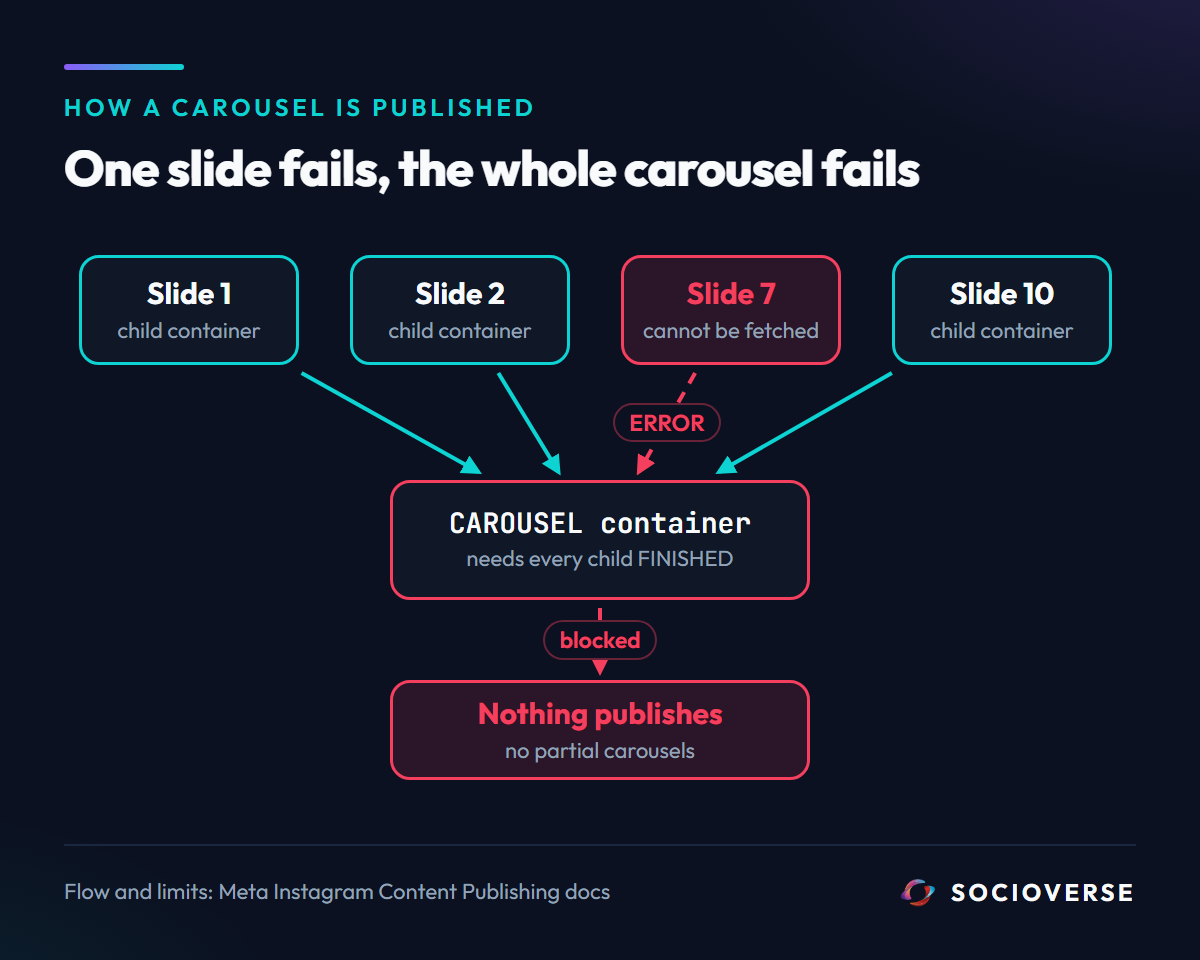
That structure has a consequence most schedulers never surface: there is no partial carousel. Instagram will not publish nine good slides and skip the tenth. One child that fails makes the parent impossible, and the whole post fails with it.
The rules every slide has to pass
Because each slide is validated independently, each slide has to clear every rule on its own. These are the ones that matter, quoted from Meta's Content Publishing guide and the IG User Media reference:
| Rule | Meta's wording | What it means for a carousel |
|---|---|---|
| Slide count | "Carousels are limited to 10 images, videos, or a mix of the two." | Eleven slides is not a longer carousel, it is a rejected one |
| Image format | "JPEG is the only image format supported. Extended JPEG formats such as MPO and JPS are not supported." | PNG and WebP slides are outside the documented contract |
| Image size | "File size: 8 MB maximum." | Checked per slide, not per carousel |
| Image aspect ratio | "Must be within a 4:5 to 1.91:1 range" | A 9:16 story-sized slide is out of range |
| Image width | "Minimum width: 320" and "Maximum width: 1440" | Very small exports fail, not just very large ones |
| Cropping | "Carousel images are all cropped based on the first image in the carousel, with the default being a 1:1 aspect ratio." | Slide one sets the frame for every slide after it |
| Reels | "Reels cannot appear in carousels" | A video slide is a carousel video, not a reel |
| Hosting | "We cURL media used in publishing attempts, so the media must be hosted on a publicly accessible server at the time of the attempt." | Your file must be fetchable at publish time, not just at upload time |
Two of those rows cause most real failures, and neither is about how the slide looks.
The hosting rule is about time. Meta does not receive your file when you upload it to a scheduler. It fetches the URL at the moment the child container is created. A link that has expired, moved, been deleted from storage, or sits behind a login between the day you scheduled and the day it publishes is a slide Instagram cannot fetch.
The cropping rule is silent. A portrait slide one crops a landscape slide five. Nothing errors. The post publishes and slide five is not the slide you designed.
Where carousels actually break
1. The error names the wrong problem
Back to the message at the top: Only photo or video can be accepted as media type, code 9004, subcode 2207052.
It reads like a file-type complaint. In practice it is what Instagram says when it could not get usable media from the URL it was given. Developers on other open-source schedulers report the same code pair arriving alongside a "media fetch failed" description, including on URLs that load fine in a browser. The file type is rarely the problem. The fetch is.
That matters because the obvious fix, re-exporting the image, does nothing when the real cause is a dead link, a URL that returned an HTML error page, or a storage host Meta's fetcher could not reach. When you see 2207052, check that every slide's URL returns the actual file, publicly, right now, before you touch the design.
2. One slide fails the whole post, and the error rarely says which
Instagram's error is attached to the container that failed. If a scheduler creates ten child containers and reports only "carousel failed", the one piece of information that would let you fix it, which slide, is gone. You are left re-uploading all ten and hoping.
3. Undocumented tolerance is not a contract
Meta's documentation says JPEG only. Our own production logs contain PNG carousel slides that Instagram accepted and finished anyway.
That is not permission. It is undocumented behaviour that can change without a changelog entry, and a pipeline that quietly depends on it will break on a date nobody announces. Export carousel images as sRGB JPEG and the question never comes up.
4. A carousel spends more of your container budget than it looks
Meta counts publishing and container creation separately.
On the publishing side, "Publishing a carousel counts as a single post" against the limit of "100 API-published posts within a 24-hour moving period."
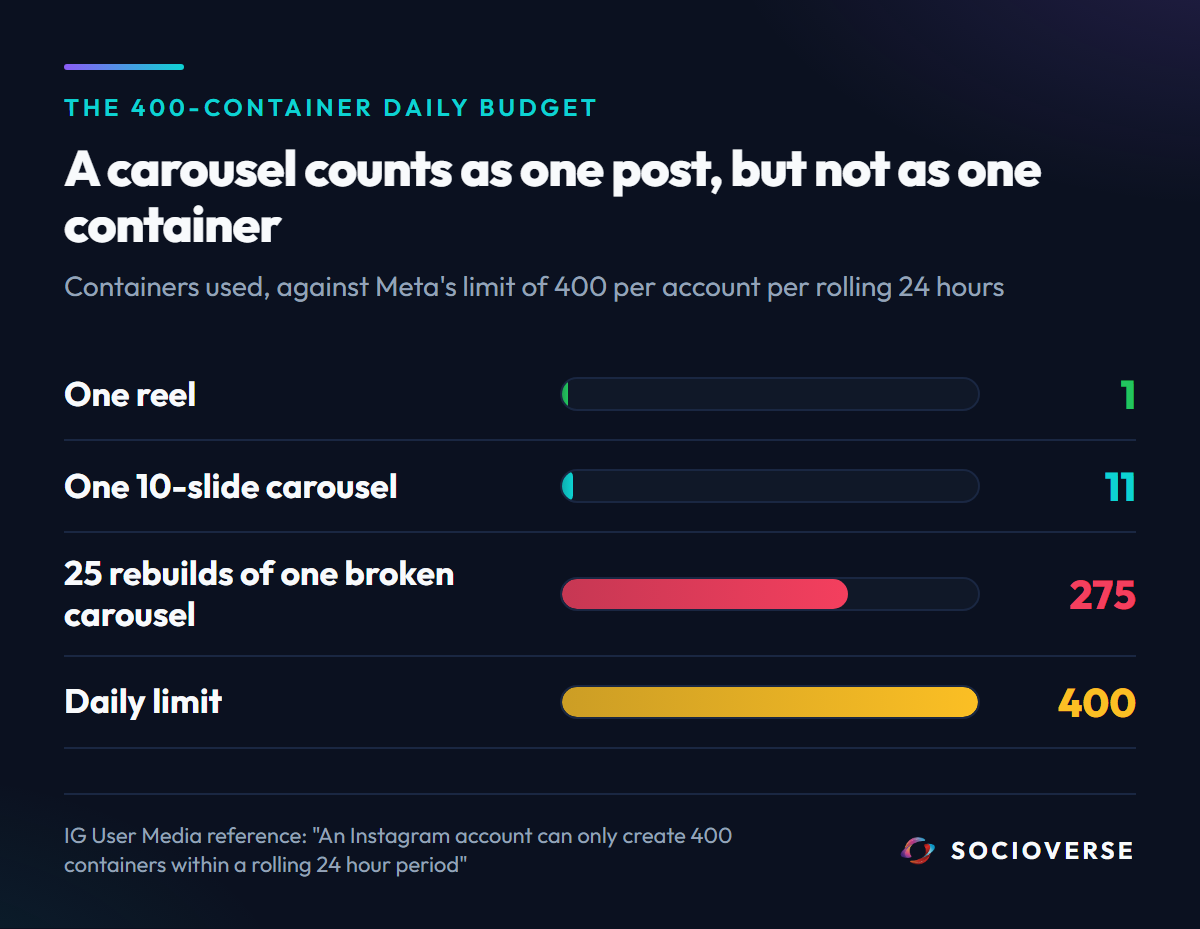
On the container side, the IG User Media reference is explicit: "An Instagram account can only create 400 containers within a rolling 24 hour period". A ten-slide carousel spends eleven of those. A tool that retries a failing carousel by rebuilding every child from scratch spends eleven more on each attempt. Twenty-five rebuilds of one broken carousel use most of an account's daily container budget and publish nothing.
5. The children have a clock too
"Containers expire after 24 hours" applies to every child, not just the parent. A carousel whose last slide is still processing when the scheduler gives up, or whose publishing job is abandoned between steps, leaves a set of ready children that expire unused. The next attempt has to start again.
How Socioverse publishes a carousel
The design goal is simple to state: find the broken slide before Meta does, and when Meta finds one first, name it.
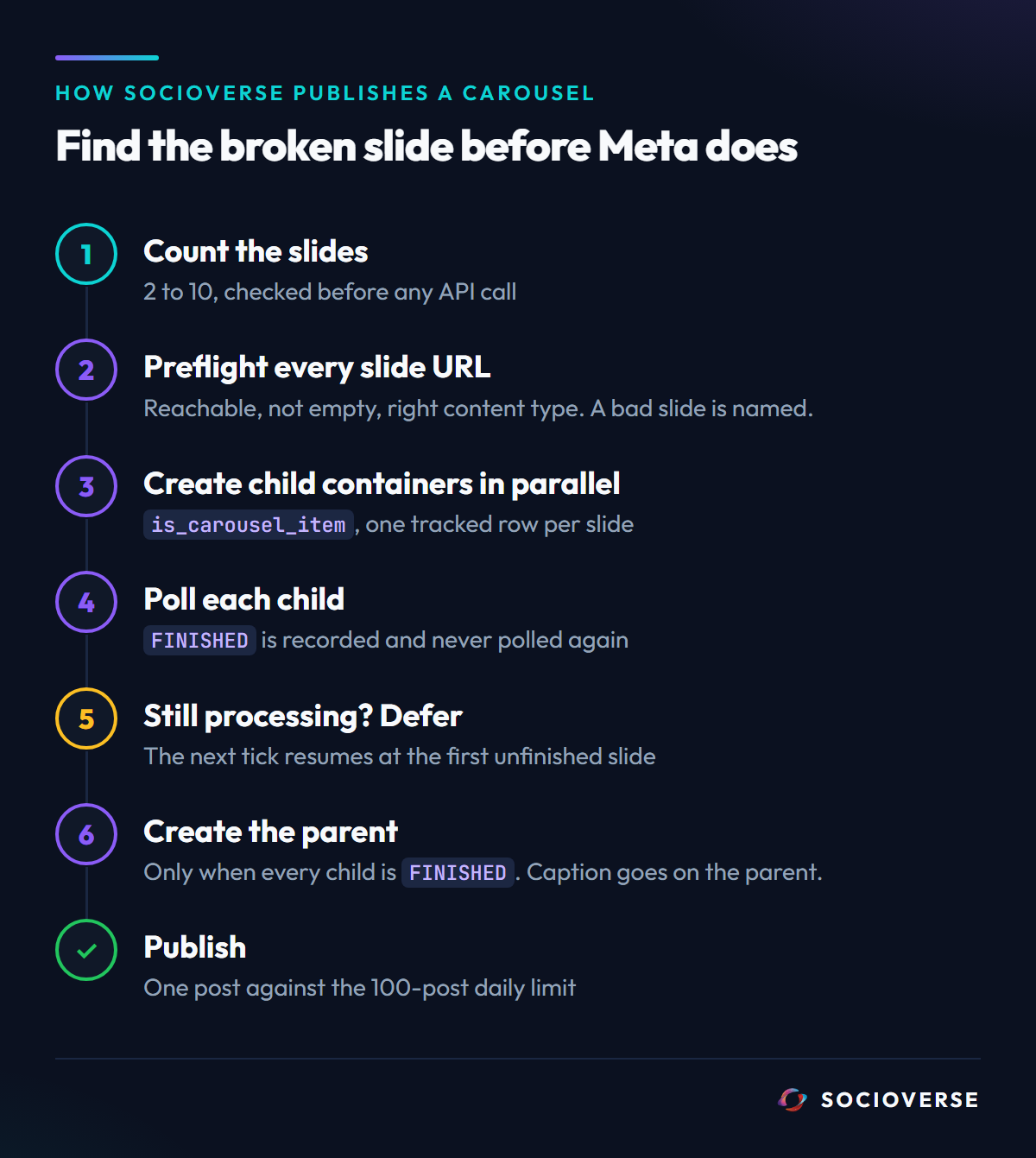
Slide count is enforced before any API call. A carousel with fewer than two or more than ten slides is rejected in our own validation with the actual count in the message, instead of spending containers to learn the same thing from Meta.
Every slide is preflighted in parallel. Before a single container is requested, each slide's URL gets a HEAD request that checks three things: that it is reachable (and which HTTP status it returned if not), that the file is not empty, and that its content type matches what the slide claims to be. A failure is recorded against the post as a structured payload naming each bad slide, for example "Slide 7: not reachable (HTTP 404)". This is aimed squarely at the 2207052 class of failure: a URL Meta cannot fetch is caught while it is still cheap to fix. It checks reachability and file type, not every image specification, which is why the checklist below still matters.
Child containers are created in parallel, and each one is tracked. Every slide's container ID and status is written to its own row. If Meta rejects a slide at creation, that slide's row is marked failed immediately and the error carries the slide number and media type.
Children are polled, and finished ones are never re-polled. The publisher checks each child briefly. A child that has reached FINISHED is recorded and skipped on every later attempt. A child still processing does not fail the post or block the worker: the post is deferred and the next scheduled tick resumes from the first unfinished slide. A child that reports ERROR is marked failed and named.
The parent is created only when every child is finished. The caption goes on the parent carousel container, the parent's ID is stored the moment Meta returns it, and the parent is polled with the same defer-and-resume behaviour before the publish call. A resumed attempt reuses the stored children and parent instead of rebuilding them, which is what keeps a slow carousel from quietly eating the 400-container budget.
What to check when your carousel did not publish
- Find the slide first. If your tool does not tell you which slide failed, test each slide URL yourself. A slide URL that does not return the image file in a private browser window is your answer.
- Treat
2207052as a fetch problem. Confirm every slide is publicly hosted and still live before you re-export anything. - Export as JPEG, sRGB, 1440px wide or less, under 8 MB. It is the documented contract. Anything else is luck.
- Keep every slide between 4:5 and 1.91:1, and put the aspect ratio you want on slide one, because slide one crops the rest.
- Count the slides. Ten is the ceiling, including videos.
- Do not retry a failing carousel in a loop. Each full rebuild spends up to eleven of your 400 daily containers.
- Never put a reel in a carousel. A carousel video slide is a carousel item, and reels cannot appear in carousels.
Frequently asked questions
Why did my Instagram carousel fail to publish?
Most often because one slide could not be fetched or failed validation. A carousel is published as one child container per slide plus a parent container, and if any single child fails, the parent cannot be created and the whole carousel fails.
What does "Only photo or video can be accepted as media type" mean?
It is error code 9004 with subcode 2207052. Despite the wording, it usually means Instagram could not fetch usable media from the slide's URL. Check that the URL is public, live and returns the file itself before changing the image.
How many slides can an Instagram carousel have through the API?
Up to ten. Meta's documentation states that carousels are limited to 10 images, videos, or a mix of the two.
Can I use PNG images in an Instagram carousel?
Meta's documentation says JPEG is the only supported image format. Some PNG files are accepted in practice, but that is undocumented behaviour, so export carousel slides as JPEG.
Why does one slide of my carousel look cropped?
Instagram crops every carousel image based on the first image in the carousel, with a 1:1 default. Set the aspect ratio you want on slide one.
Does a carousel count as one post for Instagram's API limits?
For the 100 posts per 24 hours publishing limit, yes. For container creation, no: every slide is its own container, and an account can create 400 containers in a rolling 24-hour period.
Sources and references
All Meta-attributed quotes were taken from the following pages, accessed September 13, 2026.
- Carousel publishing flow, the 10-item limit,
is_carousel_itemandchildren, carousel cropping, JPEG as the only supported format, media fetched by cURL from a public server, carousels counting as a single post, and the 100-post rolling 24-hour limit: developers.facebook.com - Instagram Content Publishing - Image specifications (format, 8 MB, 4:5 to 1.91:1, width 320 to 1440), the 400-container rolling 24-hour limit, container expiry after 24 hours, and reels not appearing in carousels: developers.facebook.com - IG User Media reference
- Error 9004 / 2207052 reported as a media fetch failure by another scheduler's developers: github.com - gitroomhq/postiz-app issue 1472
- Socioverse: socioverse.io
Related reading: why scheduled Instagram reels fail to publish, why Instagram automations stop after 60 days, and Instagram scheduling.