How to Add a Contact Form to a Canva Website
The contact form that was never there
You built your website in Canva. It looks exactly how you wanted, it took an afternoon, and it is live on your own domain. Then you go to add a "Get in touch" section and hit the wall every Canva site owner hits: there is no obvious way to make a form that sends you the enquiry, with the person's name and email, and keeps it somewhere you can find next month.
Search for the fix and you get a page of tutorials, almost all written by form companies, each ending with "and that is why you should use our form builder." None of them is wrong exactly. They just skip the two facts that decide the whole question, both of which are on Canva's own help pages.
We build Planets at Socioverse, which includes a form builder that gives a Canva site (or any site) a contact form backed by a real lead database. So yes, we have a horse in this race, and it is in the comparison table below alongside twelve others, judged on the vendors' own published numbers. Every Canva, Google, Microsoft and vendor claim below is quoted or taken from their own pages, linked in Sources, accessed September 19, 2026.
First principle: a Canva site cannot run a form, it can only point to one
Two facts from Canva's help center settle most of this.
Canva's own forms are anonymous on websites. Canva does have a native form element, added from Elements > Forms. Its limits, in Canva's words: "You can add up to 10 questions per form." Responses are viewed in a panel and can be downloaded as CSV. And then the line that matters: "On Canva Websites, responses are always anonymous. Names can't be collected."
That makes it a fine poll and a useless contact form. A contact enquiry you cannot reply to is not a lead.
Canva accepts links, not code. Canva's Embeds app works by pasting a web address: "Paste the web link of the media you wish to add." There is no HTML block and no script slot on a Canva website. So the usual advice for other site builders ("paste this embed code") has nowhere to go.
Put those together and every working contact form on a Canva site is the same thing underneath: a form hosted somewhere else, which your Canva page links to or displays. The tool you choose is not really adding a feature to Canva. It is deciding where every enquiry lives after someone presses Send.
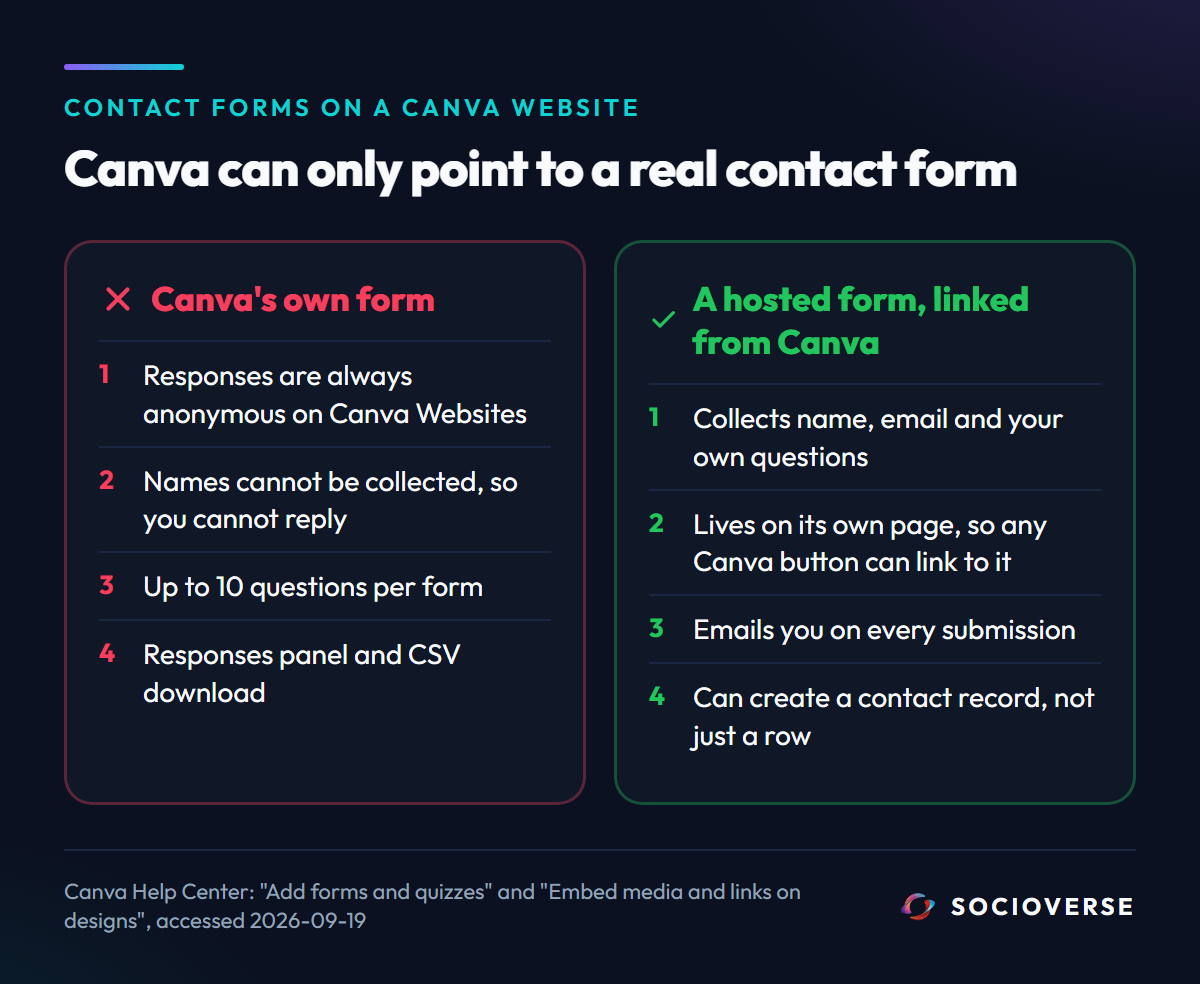
That reframes the choice. You are not picking a form. You are picking the database behind your website.
The three places a submission can end up
Every form tool sends a submission to one of three kinds of place, and the difference only shows up months later.
- An inbox. You get an email per submission and that is the record. It works until you need to find "the florist who asked about pricing in March" or see how many enquiries came from your site this quarter.
- A spreadsheet or response table. Each submission is a row. Better, but a row is not a person. The same client who fills your form twice is two rows, and nothing connects them to the conversation you had with them on Instagram last week.
- A contact database. Each submission creates or updates a person, de-duplicated by email, with their answers attached and a history of every time they reached out. This is what a CRM does, and it is what "your Canva site now has a database" actually means.
Most free form tools stop at 1 or 2. Contact records are usually a CRM product, a paid add-on, or both.
13 contact form tools compared
Numbers are from each vendor's own pricing or help page on September 19, 2026, monthly billing unless noted. "Not stated" means the vendor's page did not say, and we did not guess.
| Tool | Free plan ceiling | Branding removed from | Auto-reply to the person | Where a submission lives |
|---|---|---|---|---|
| Canva forms (native) | 10 questions per form | n/a | Impossible on websites: responses are anonymous | Responses panel, CSV download |
| Google Forms | Free with a Google account | n/a | Only "send responders a copy of their response"; custom follow-ups need an add-on | Responses tab |
| Microsoft Forms | 200 responses per form (free personal account) | n/a | Not stated | Responses tab |
| Typeform | "A limited number of responses per month" | Plus, $79/mo | Not stated | Response table; contacts are a $25/mo add-on, not on Free or Basic |
| Jotform | 5 forms, 100 submissions/mo, 500 stored in total | Bronze, $39/mo | Not stated | Submission table |
| Tally | Unlimited forms and submissions (fair use) | Pro, $24/mo | Pro, $24/mo | Response table, integrations |
| Fillout | 1,000 responses/mo | Pro, $40/mo | Included on Free ("Respondent emails") | Response table, integrations |
| Zoho Forms | 3 forms, 500 submissions/mo | Any paid plan | Not stated | Zoho Forms, Zoho apps |
| Paperform | 30 submissions/mo | Pro, $49/mo | Pro and Business | Submission table |
| Formester | Unlimited forms and responses | Personal, $13/mo | Custom email notifications on Free | Response table |
| Formspree | 50 submissions/mo, 30-day archive | n/a (you write the HTML) | Professional, $30/mo | Email and dashboard |
| HubSpot Forms | Free | Not stated on the forms page | "Automated follow-up emails" | HubSpot CRM contact |
| Socioverse Forms | No monthly submission cap | No Socioverse badge on the form | Optional auto-reply on every plan | Lead Bank contact, de-duplicated by email |
A few things the table does not show on its own:
- Formspree cannot work on a Canva site at all. It is a form backend: in its own words you "point a form at a Formspree endpoint." That needs an HTML form, which Canva cannot hold. It is a great tool for developers with their own code and the wrong tool here.
- Jotform's storage cap deletes data. Its pricing FAQ says that if you exceed your total submission storage, "the system will delete the oldest form response to make room for new submissions." On the free plan that total is 500.
- Microsoft's 200 is per form, not per month. On a free personal account, a form stops taking responses at 200, full stop.
- Only two tools in the table turn a submission into a contact record on a free plan without connecting another app: HubSpot, which is a CRM first, and Socioverse. Typeform's contact database is a paid add-on on its larger plans. Everyone else can get there through integrations, which is one more tool to set up and pay for.
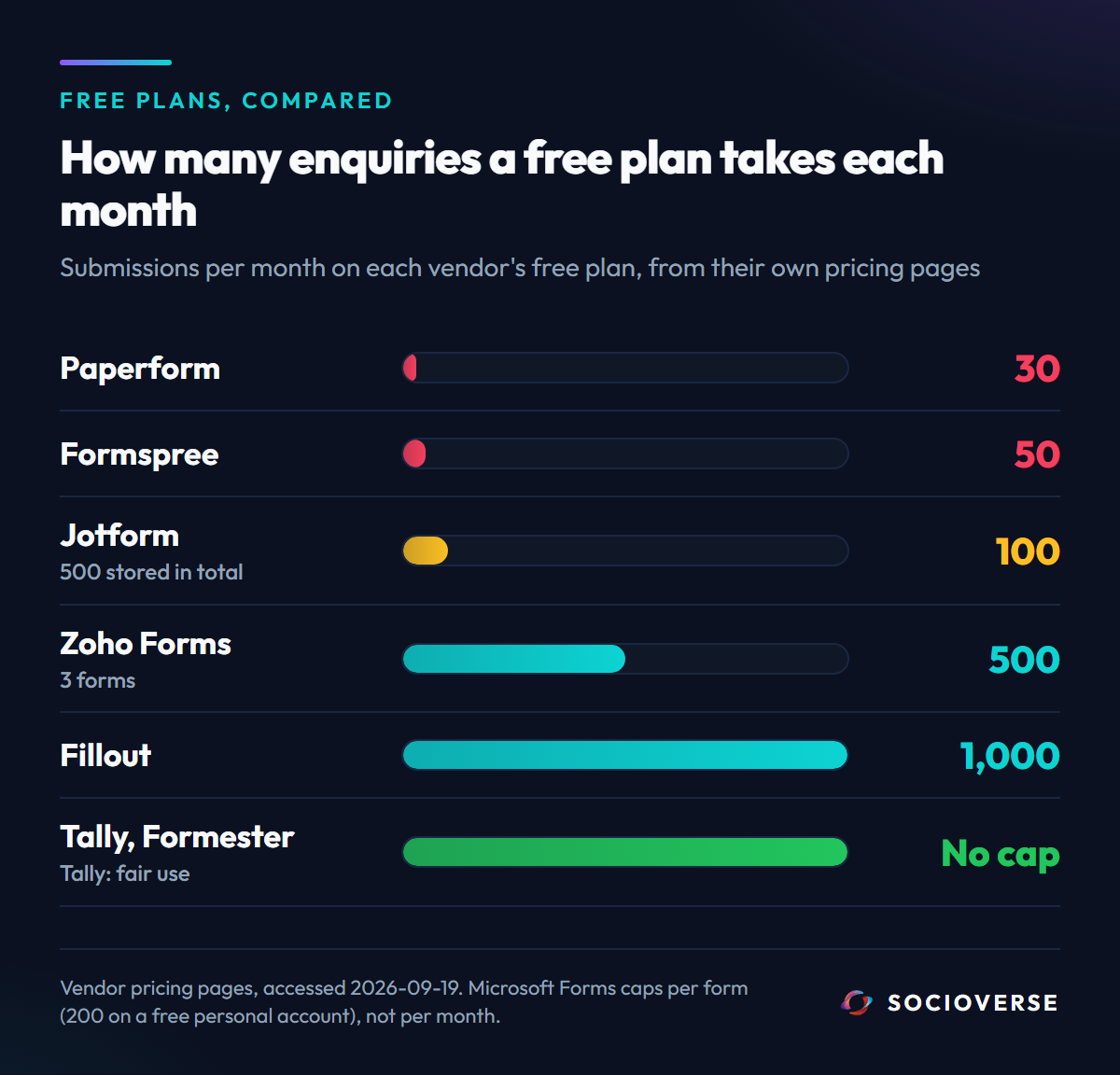
If you need conditional logic, file uploads, payments inside the form or multi-page flows, Tally, Fillout and Jotform are genuinely strong and we would point you to them. If you need a contact form whose job is to turn visitors into leads you follow up with, read on.
How to add a contact form to a Canva website (any tool)
Because Canva takes links, the method is the same whichever tool you pick:
- Build the form in your tool of choice and publish it. Every hosted form tool gives you a public link to a page that holds just the form.
- In Canva, link to it. Add a button or a line of text such as "Work with me" and link it to the form's URL. This works on every Canva website, on every plan, every time.
- Or try Canva's Embeds app. Paste the same link into Embeds. Whether Canva shows the live form or a link preview is decided by Canva for each web address, so test it in preview before you publish. The button in step 2 is the version that never breaks.
- Submit a test enquiry from your phone, and check it arrives where you expect: your inbox, your auto-reply, and the tool's records.
Step 4 is the one people skip, and it is how you find out a form was emailing an old address for three months.
What Socioverse Forms does with a submission
Socioverse Forms live inside Planets, our link-in-bio and storefront pages. You build a form once in the dashboard under Planets > Forms, and then use it three ways: as a block on your Planet, as its own page at socioverse.io/planet/@you/f/<form> (the link you put on your Canva site), or embedded on any site that accepts code.
The form itself is deliberately simple. Eight field types: text, long text, email, phone, number, dropdown, checkbox and date. Email is a locked field, because it is both the reply channel and the key your leads are de-duplicated on.
The interesting part is what happens after Send. Here is the path every submission takes, from our own server code:
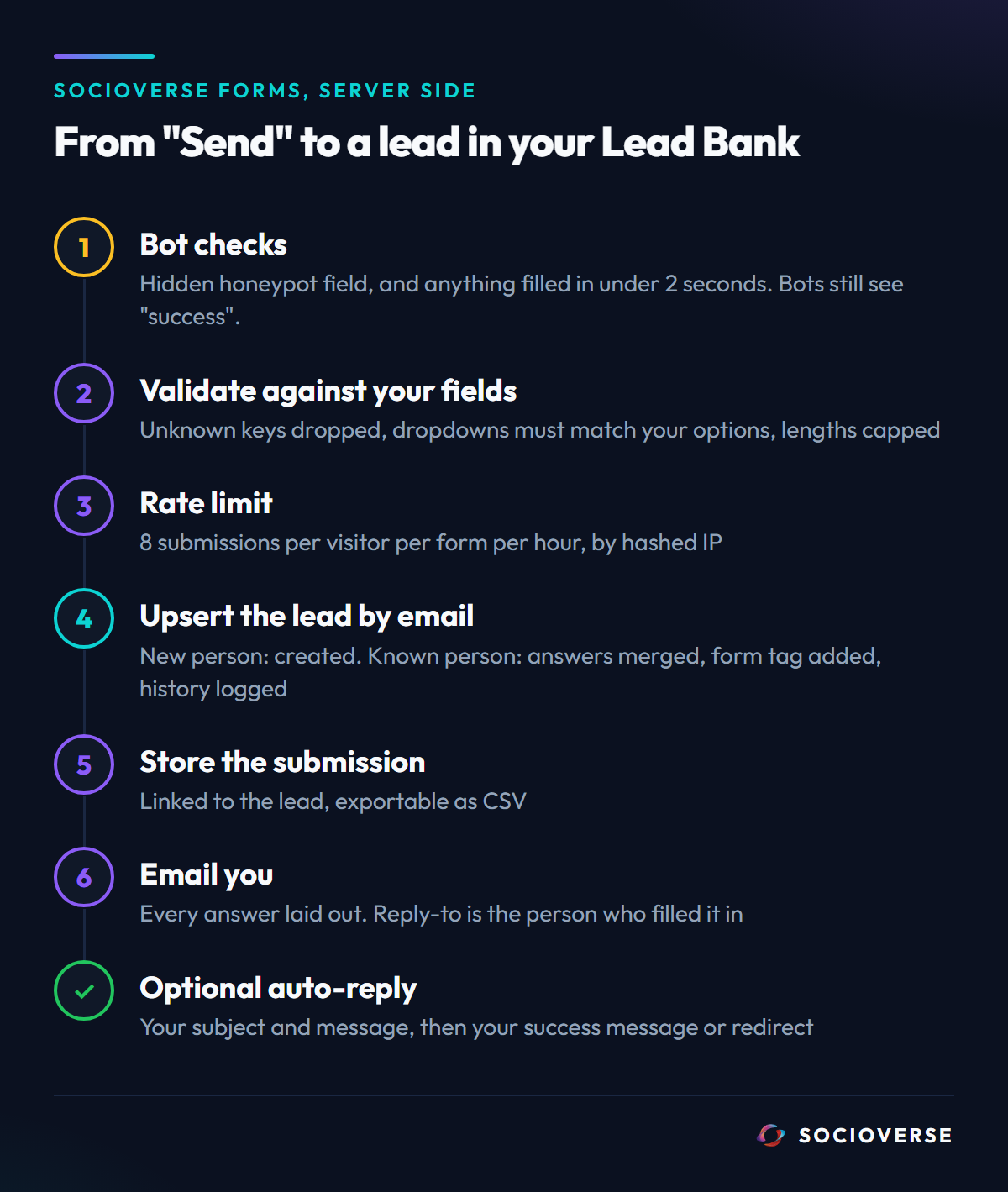
Spam is stopped before it costs you anything. A hidden honeypot field catches bots that fill in every input. A submission completed in under two seconds is treated as a bot, because a person cannot read and fill a form that fast. Both are answered with a normal "success" response, so a bot learns nothing from being rejected. A single visitor can submit the same form at most eight times an hour, tracked by a hashed IP address, never the raw one.
Your form's own schema is the only thing trusted. The answers are re-checked on the server against the fields you defined. Keys you never created are dropped, not stored. A dropdown answer must be one of your options. Lengths are capped per field type. The browser does the same checks for speed, but the server copy is the one that counts.
Every enquiry becomes a lead, not a row. If the email is new, Socioverse creates a contact in your Lead Bank with source contact_form, their name, and their answers stored as custom fields. If the email already exists (say they came in through an Instagram comment-to-DM automation last month) the existing lead is updated instead: the answers are merged in, a contact_form:<form> tag is added, and the submission is written to that lead's activity history. One person, one record, whichever door they came through.
A contact enquiry is not marketing consent. Leads created by a contact form are stored with marketing opt-in set to false. Someone asking about your pricing has not agreed to your newsletter, and the data model says so.
You get the email, and replying just works. Each submission sends you a branded notification with every answer laid out. Its reply-to is the person who filled the form, so pressing Reply answers them directly. You can send notifications to any list of addresses; if you set none, it goes to the workspace owner's email. If a notification fails, the failure is recorded against that submission instead of vanishing.
The person gets an answer too, if you want. An optional auto-reply sends them your own subject and message the moment they submit. Afterwards they see your success message, or get redirected to any page you choose, such as a booking page or a thank-you page on your Canva site.
Embedding it on sites that do accept code
Not every site is a Canva site. On WordPress, Webflow, Framer, Wix, Squarespace or a hand-built page, the Forms dashboard gives you an embed snippet that places the form in an iframe. The form page reports its own height to your page, and the snippet resizes the frame to match, so there is never a scrollbar inside your form. Because it is isolated in a frame, your site's CSS can never break the form's layout, and the form can never break your site's.
If you would rather write your own HTML, the dashboard also gives you an API snippet that posts straight to the same endpoint. It goes through the same spam checks, schema validation and Lead Bank path as everything else.
What it costs
Forms are included on every Socioverse plan, including Free, with no monthly submission cap. The only limits are the per-visitor rate limits described above. On the Free plan, form pages use the Socioverse house theme; paid plans, from Starter at $18/month, unlock your own Planet theme or one of five standalone form themes built for embedding on other sites.
The same Lead Bank holds the leads from your Instagram automations, so a website enquiry and a comment-to-DM lead sit in one list, with the same stages, tags and CSV export.
The short version
- Canva's native forms cannot collect names on a Canva website. Canva's help center says responses there are "always anonymous."
- Canva takes links, not HTML. Every real contact form on a Canva site is a hosted form page that your site links to.
- So the real decision is where each submission lives: an inbox, a spreadsheet, or a contact database.
- For complex forms (logic, uploads, payments), use Tally, Fillout or Jotform.
- For a contact form whose job is leads, use one that creates a de-duplicated contact per person. On a free plan, that is HubSpot or Socioverse.
Sources
All accessed September 19, 2026.
- Canva Help Center, "Add forms and quizzes": https://www.canva.com/help/polls-quizzes/ - "You can add up to 10 questions per form." "On Canva Websites, responses are always anonymous. Names can't be collected."
- Canva Help Center, "Embed media and links on designs": https://www.canva.com/help/embed-media/ - "Paste the web link of the media you wish to add."
- Google Docs Editors Help, Google Forms email notifications: https://support.google.com/docs/answer/139706
- Microsoft Support, "Form, question, response, and character limits in Microsoft Forms": https://support.microsoft.com/en-us/forms/form-question-response-and-character-limits-in-microsoft-forms - personal accounts: "up to 200 for free accounts up to 1,000 for paid accounts."
- Typeform pricing: https://www.typeform.com/pricing/
- Jotform pricing: https://www.jotform.com/pricing/
- Tally pricing: https://tally.so/pricing
- Fillout pricing: https://www.fillout.com/pricing
- Zoho Forms pricing: https://www.zoho.com/forms/pricing.html
- Paperform pricing: https://paperform.co/pricing/
- Formester pricing: https://formester.com/pricing/
- Formspree plans: https://formspree.io/plans
- HubSpot, free form builder: https://www.hubspot.com/products/marketing/forms
- HubSpot Knowledge Base, "Create forms": https://knowledge.hubspot.com/forms/create-forms - "If the email address submitted matches an existing contact record in your database, the details on the existing record will be updated."